
 English
 Polski


When to escalate JV Casino complaints
If customer support leaves the issue unresolved, file a formal complaint to submit your evidence together and receive a reasoned response. Use customer support first when you need someone to check an account entry, a missing reward or the status of a payment. Live chat is available 24/7. Keep the earlier conversation so the complaints team can see what support already addressed.
A missing free bet handled through chat in Poland
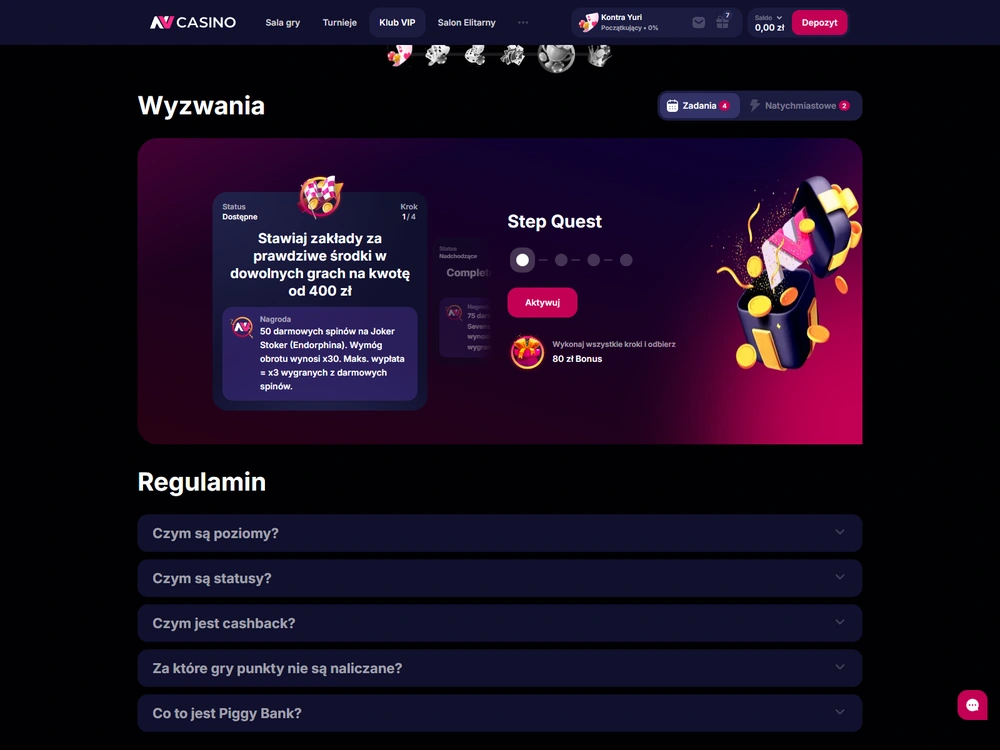
The mission reward hadn’t appeared after I placed three qualifying bets, so I contacted live chat in Polish. I supplied the three bet IDs, which the agent passed to the promotions team in the same chat. The 40 PLN free bet appeared in my profile eight minutes after I sent the message.
When I reopened the chat history and mission card, the free bet was still there. The credit was separate from the cash settlement of the bets.
What to submit with a formal complaint
Give the complaints team your full name, account username, registered email address, a description with the relevant dates and times, and supporting records so it can identify the account, locate the event and understand the result you’re disputing. JV Casino complaints can cover account, game, bonus and financial disputes. A useful complaint ties each document to an event in the account, such as a withdrawal request, a cancelled transaction or a reward that failed to appear.
Match the evidence to the issue
For a payment dispute, start with the transaction reference, the amount and currency, and the status shown in your account. Put the operator’s message next to that entry so the team can see which request the message concerns. If an attempt was cancelled and you sent another, record each attempt separately. The withdrawal guide explains the stages between requesting a withdrawal and receiving it.
For a disputed bonus, keep the offer terms that applied to your account, the record of the qualifying activity and the reward status. A screenshot of the missing credit is easier to interpret alongside the condition you expected to meet. Include the relevant chat if support gave a reason for rejecting or delaying the reward.
For an account issue, record the action you attempted, the message that appeared and when you saw it. If you were asked for a document, note when you submitted it and what reply you received. Include only records that help the team locate or explain the issue. Keep your password and verification codes out of the complaint.
File and follow up
If you’re deciding how to file a complaint with JV Casino, use the online form or email the completed downloadable form once you have the details of the unresolved issue. Keep a copy of the submission and its acknowledgement.
- Record the incident. Write down the date and the time shown on your device. For an event in Poland, identify the time as Polish local time if that is the clock you used. Keep the transaction reference, game round ID or bet ID when it’s available.
- Contact support. Describe the issue, ask the agent to check the relevant record and save the conversation. If support corrects an entry, check the account or transaction history to see when the change actually appears.
- Prepare the formal complaint. Enter your full name, account username and registered email address. Describe the events in order and include the relevant dates and times. Attach the applicable transaction records, screenshots or chat history. State what you want the operator to look into.
- Send it through the operator’s complaints route. Complete the online complaint form, or download the form and send the completed document to the operator’s designated complaints mailbox. Customer support can help you find the form or explain what the policy asks for.
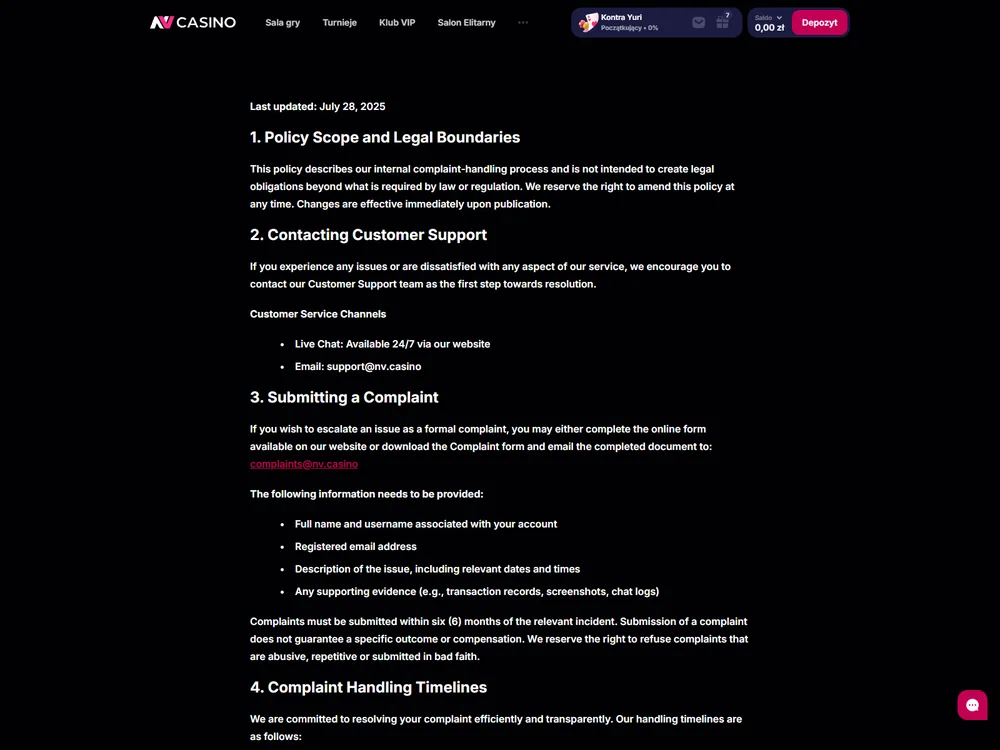
Fields in the formal complaint form - Keep the submitted copy and the acknowledgement. Save the message or confirmation that shows when you sent it. If the complaints team asks for more information, reply to that request and keep the correspondence together.
A concise chronology helps if there were several related actions. For example, distinguish the date you submitted a withdrawal, the date a status changed and the date support replied. If your contention is that a withdrawal never reached you, say which request you mean and show where the record of that request ends.
The operator can refuse abusive, repetitive or bad-faith submissions. It can also close a case without resolving it if you supply too little information or fail to cooperate in time. If the operator asks for a specific transaction record, send the record for that transaction and identify the entry you want checked.
The policy provides for a timely, reasoned response. When it arrives, check whether it addresses the event, amount or account record you submitted. For a payment case, keep that response with the transaction history so you can track the decision and the status of the money separately.
Deadlines for filing and responding
Submit JV Casino complaints within six months of the incident under the operator’s complaint policy. Section 22.3 of the terms says claims about accounts, gaming activity, bonuses and financial transactions are forfeited under those terms if the reporting deadline is missed. A technical report to support has a separate deadline.
| Action or stage | Deadline | When it applies |
|---|---|---|
| Submit a formal complaint | Within six months of the incident | Account, gaming, bonus or financial disputes under the operator’s terms |
| Report a technical incident | Within 10 days of the incident | Contact support about a game round, an incorrectly credited win or a profile issue and give the time to the minute |
| Acknowledgement of receipt | Within one week | The operator confirms receipt of the formal complaint |
| Formal complaint resolution | Up to four weeks | The operator can extend this once by up to another four weeks for a complex case |
| Responsible gambling complaint | Within five business days | Priority resolution under the complaint policy |
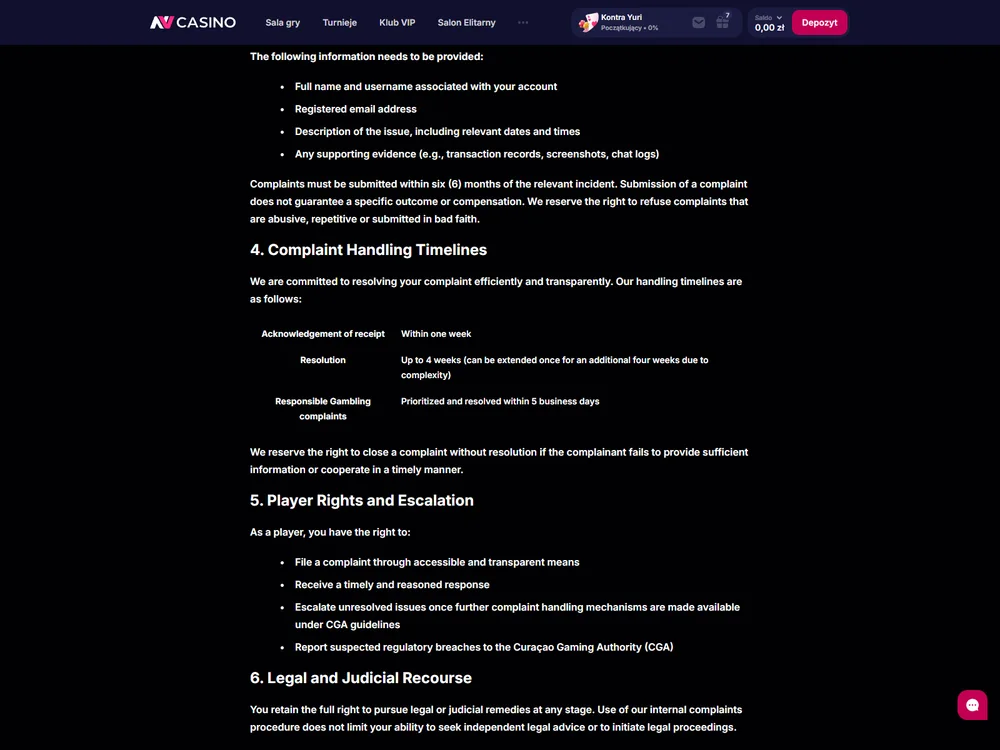
Keep the submission, acknowledgement and decision as separate entries in your timeline. The acknowledgement confirms receipt. If the operator extends a complex case, keep that message with the correspondence. Filing a complaint carries no guarantee of compensation, and the resolution timetable gives no date for money to reach your account.
Report a game or account fault promptly
Contact support within 10 days under §15.2 if a game round freezes, a win is credited incorrectly or you have a covered profile issue. Give the date and time to the minute. The operator can decline to examine the case on technical grounds without that level of detail.
Report the incident promptly even if you’re still collecting screenshots or checking your balance.
Identify the game or account action and note the time, the on-screen outcome and the corresponding entry in your account. Add the round reference if you have it. If the display shows a different outcome or balance from the account record, describe the discrepancy and preserve the relevant screens.
Section 22 treats server records as decisive in a dispute. If the result or balance displayed on your device differs from the game provider’s server record, the terms give precedence to the provider’s record. A screenshot can show what you saw and help the operator locate the event. Timings and IDs make it easier to compare the two records.
Raise a responsible gambling issue early
The operator gives responsible gambling complaints priority and sets a resolution period of five business days. If you need a limit or want to self-exclude, contact live chat for that action. You can explain the problem with a previous request in a formal complaint while asking support for any immediate account measure you need.
If your complaint concerns a restriction you asked for, include any confirmation from support and describe which products the restriction was meant to cover. See Responsible Gambling for the self-exclusion procedure and the effects of deactivation.
Who can take a complaint further
Nixxe B.V. operates JV Casino and handles individual player complaints through its internal procedure. The policy says players can escalate unresolved issues when further complaint-handling mechanisms become available under Curaçao Gaming Authority guidelines. It also describes the option of seeking independent legal advice or pursuing court proceedings at any stage.
The Curaçao Gaming Authority (CGA) takes reports about suspected breaches of Curaçao gaming regulations. The operator’s complaint policy says the CGA does not intervene in individual disputes. The licence and safety guide explains the scope of the operator’s Curaçao certificate for readers in Poland.
Use editorial contact for a correction to this article or a question about the publishing site. Send the evidence for an account or transaction dispute through the operator’s complaints process. If support has left your dispute open, note the incident date, gather the relevant records and submit the complaint within the applicable filing window.
Frequently asked questions
When should I file a formal complaint with JV Casino?
File when support has left your dispute unresolved. Use the online complaint form or send the completed downloadable form to the operator’s complaints mailbox. The six-month filing window runs from the incident. Keep that date in your timeline and file before the deadline.
What should I report if a game round freezes at JV Casino?
Give support the game name, the date and time to the minute, what the screen showed and the round reference if you have it. Report the fault within 10 days. Include any screenshot that helps locate the round.
Does JV Casino’s four-week deadline tell me when I’ll be paid?
The period applies to a decision on the complaint. A complex case can take up to four extra weeks if the operator uses its one extension. The policy gives no guarantee of compensation or a payment date.
How quickly does JV Casino handle a responsible gambling complaint?
The policy gives these complaints priority and sets a five-business-day resolution deadline. For self-exclusion, contact live chat separately. The restriction starts when support confirms that it has applied it.