
 English
 Polski














What JV Casino registration requires
You must be at least 18, or meet the higher minimum age that applies where you are, and create the account with your own details. The operator may ask for proof of age at any point. If you cannot provide satisfactory proof, the rules allow the operator to block access or cancel the account.
Country of residence and eligibility
Enter your actual country of residence and check the rules that apply where you are. Poland appears as a country option, and the Polish account in the test used PLN. Those facts tell you how to fill in the relevant fields. Eligibility depends on the operator’s territorial terms and the rules at your location. Check both before submitting the form.
The operator’s country restrictions apply to opening the account as well as using it. A location can appear in an address field even when the terms restrict service there. The Curaçao licence covers the operator under that jurisdiction. A reader in Poland should treat the licence, the address selector and the practical result of a Polish sign-up as three distinct pieces of information.
Your details and the one-account rule
The operator allows one main account per person and requires complete, accurate information. Use an inbox you can open and a phone number you control. Enter your name, date of birth and address consistently, and keep them current. The operator can hold registration or restrict an account if the details are incomplete, incorrect or out of date.
If you already have an account, recover access through the login guide. Under the operator’s rules, an account opened in addition to your main account counts as a duplicate. It can close both accounts, void transactions and withhold deposits or stakes under its duplicate-account terms. Any deposits, winnings or bonuses obtained while a duplicate account was active can be forfeited or recovered. The operator can demand repayment of withdrawals from the main or duplicate accounts. If you discover a duplicate, report it to the operator’s support team immediately.
How the two-step account form works
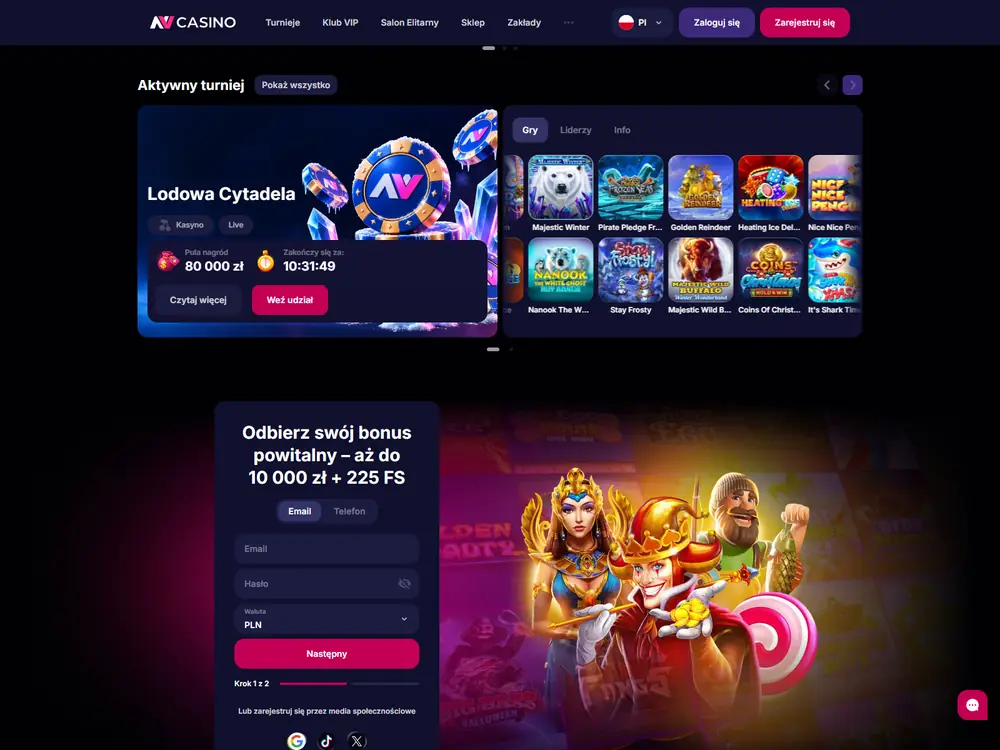
Use the first step for your contact details, password and account currency. The next screen collects your personal details and assent to the operator’s rules. If you want to know how to create a JV Casino account using email, the sequence below follows the Polish first screen and identifies the English second-screen labels separately.
Start with your email and account currency
Select Email to follow the route used in the Polish test. The first screen also offers Telefon, and the contact field reads Email lub Numer telefonu. Hasło is the password field and Waluta is the currency selector. Krok 1 z 2 shows your progress. Three separate sign-up buttons offer Google, TikTok and X.
- Open the operator’s registration form and select Email on the Polish form.
- Enter your own email address and choose a password. Keep the password private. You’ll need the inbox for the confirmation link and can use the registered address for recovery if you lose access later.
- Check Waluta before choosing Następny. The Polish test used PLN. A Polish registration configuration lists ten currencies, from CHF, CLP, DKK and EUR to HUF, NOK, PLN, RON, SEK and USD. Use the choice displayed in your form. The currency selector tells you how the account is set up. Payment options have their own conditions.
| Where | Fields | What to enter or check |
|---|---|---|
| Polish form, step 1, email route | Email, Email lub Numer telefonu, Hasło, Waluta | Your email address, your password and your account currency. The Polish test used PLN. |
| Polish form, step 1, separate contact option | Telefon, Email lub Numer telefonu, Hasło, Waluta | The form offers a phone option. The completed route used email. |
| English form, step 2, personal details | First Name, Last Name, Date of birth | Enter your first name, surname and date of birth accurately. |
| English form, step 2, residence | Country, City, Address | Enter your actual country of residence, city and address. |
| Operator terms and completed Polish route | Phone number | Enter your phone number when prompted on the Polish email route. It is part of the required personal information. |
Enter your personal details and accept the rules
On the English form, Step 2 of 2 includes six personal and address fields, followed by the age and terms checkbox. Keep your phone number to hand as well. It is part of the personal information required under the rules and was entered on the tested route. The six labels in the table refer specifically to the visible English screen.
- Enter your first and last names and date of birth. Complete the country, city and address fields with your own details. On the Polish email route, enter your phone number when the form asks for it.
- Read the rules listed beside the required checkbox, then tick it if you meet the age requirement and accept the rules. The age declaration and terms acceptance are combined in this control on the English form.
- Decide separately whether you want promotional emails and whether you have a promo code for a specific offer. Select Register to submit the English form once you’ve checked the required information.
The acceptance checkbox names the Privacy Policy, Bonus T&C, Terms and Conditions, and Betting Rules. The privacy terms describe how the operator handles the information you give it to open and run an account. The separate I want to receive promotions by e-mail option controls marketing. Leave it unticked if you only want to receive the service email that confirms your account.
| Action | Status | What it covers |
|---|---|---|
| Confirm your age and accept the rules | Required | At least 18, or the higher applicable age. The English checkbox names Privacy Policy, Bonus T&C, Terms and Conditions, and Betting Rules. |
| Receive promotions by email | Optional | A separate choice about marketing emails. |
| Indicate that you have a promo code | Optional | A field for a specific offer that uses a code. |
| Confirm your email | Required on the email route | Open the message and use its link. The English prompt offers Check email and Send again. |
When to use the promo code field
Select I have a promo code if you have a code for an offer you want to use. A blank code field still allows you to complete sign-up. The Polish welcome offer tested after registration activated at the first qualifying deposit without a code. The timing matters because creating the account alone does not trigger that deposit offer. See bonuses and promotions for the offer conditions and the promo code guide for the field itself.
How to confirm your email
Finish JV Casino registration by opening the confirmation email and following the link for your account. The English confirmation screen has Check email and Send again. Use the second option if the message has not arrived. If you still cannot finish, contact the operator’s support team about the registration.
- Open the inbox for the email address you entered on the form.
- Find the registration confirmation message and open its confirmation link.
- If you cannot find the message, return to the form’s confirmation prompt, select Send again and check the same inbox.
What happened in the Polish test
I registered by email on a Tecno Camon 40 Pro 5G in Poland. I filled in the profile with my phone number and accepted the required rules separately from the marketing choice. After submitting the form, I opened the message and followed the link. Registration did not ask for an SMS code or a document upload.
I then signed in separately with the email and password I had set. On a later withdrawal, the operator used SMS and asked for proof of identity and address. Those checks applied to a different stage of the account. Set aside time for verification if the operator requests it, since it reserves the right to ask for documents at any point. See account verification for what the later checks involve.
Account opening score
The two-step email route earns 6.4/10 for the Polish account-opening scenario. The form makes the required consent and optional choices clear, while a full address and a separate trip to your inbox add work. The operator describes its identity checks and retains discretion over when to apply them.
| Criterion | Weight | Score |
|---|---|---|
| Signup friction / completion | 25% | 7.0/10 |
| Required-data clarity | 15% | 7.0/10 |
| KYC transparency | 20% | 6.0/10 |
| Account control / closure | 15% | 5.5/10 |
| Recovery / security | 15% | 7.0/10 |
| Mobile / desktop consistency | 10% | 5.5/10 |
| Final rating | 100% | 6.4/10 |
Password recovery uses the registered email, and the same account carries over to the desktop browser and mobile clients. Closing an account goes through support chat and requires confirmation. See the Methodology for the scoring criteria.
What to do after you confirm your email
Use the login guide to make your first sign-in once your email is confirmed. The 6.4/10 account-opening score reflects a two-step form followed by an inbox check. Prepare accurate personal details, check territorial eligibility and make sure you meet the 18+ or higher applicable minimum age. In the Polish test I completed sign-up without SMS or document uploads. If the operator asks for proof of identity later, see the account verification steps.
FAQ
Can I open a second account if I already have one?
The operator allows one main account. If you have lost access, use the login and recovery guide for the existing account. If you discover a duplicate, tell the operator’s support team promptly.
Can I leave the promo code field blank?
Yes. The promo code control is optional for opening an account. Check the conditions of the specific promotion if you plan to claim an offer that uses a code.
Does adding a phone number mean I have to enter an SMS code?
The phone number is part of the required personal information. The Polish email sign-up accepted the phone number without asking for an SMS code. The operator requested SMS confirmation during a separate withdrawal.
Can I sign up if Poland appears in the country list?
Poland in the list is an address choice. Check the operator’s territorial terms and the rules where you are before opening an account. The location field alone does not establish that you may use the service.
Can I register on this editorial website?
The operator handles account registration. This editorial website has no registration form and does not collect the details you enter on the operator’s form. Keep your password, confirmation link and identity documents out of messages to this website.